Connecting Klaviyo to Google Ads turns your first-party data into sharper, more profitable campaigns. The setup is simple. The value comes from choosing the right segments, getting your UK consent right and not misclicking the one setting that can starve a campaign. Get those three things correct and you are reaching warm audiences, excluding the people you should not be paying for and finding more customers who look like your best ones.
Want to have a go yourself? We have written the full step-by-step guide below, including the parts most articles get wrong.
One thing worth knowing first. Plenty of agencies run Google Ads. Plenty run Klaviyo. Very few do both under one roof and fewer still do it with permanent PAYE staff rather than freelancers or outsourced contractors. That matters more here than almost anywhere else because the entire value of this integration sits exactly where paid media and email meet.
When one accountable team owns both sides, your audiences, your suppression lists and your attribution actually line up. When it is split across two suppliers, they rarely do and both tend to claim the same sales. We run Google Ads and Klaviyo together for eCom and B2B brands across the UK. If you would rather we set this up and manage it properly, get in touch.
Why connect Klaviyo to Google Ads
Klaviyo holds the data that makes Google Ads smarter. Purchase history, browsing behaviour, lifetime value, engagement, loyalty status. Piping that into Google Ads turns broad campaigns into precise ones. Here is what it unlocks.
Retarget the people most likely to buy
The same segmentation logic you use for email and SMS works for ads. Sync your cart abandoners, recent browsers or lapsed customers into Google and serve them an ad that echoes the message in your flows. You are spending budget on warm audiences instead of cold ones.
Stop wasting spend on the wrong people
Just as useful as targeting is exclusion. Sync your recent purchasers and exclude them from prospecting campaigns so you are not paying to advertise to someone who bought yesterday. This single move often lifts return on ad spend more than any new targeting idea.
Find more customers who look like your best ones
Take a VIP or high lifetime value segment from Klaviyo, feed it into Google as a signal and let optimised targeting reach new people who behave like your most valuable customers. This is how you scale acquisition without lowering quality.
Reinforce your message across channels
Someone who gets your email and then sees a matching Google ad is far more likely to act than someone who only sees one. A connected stack lets you run genuine cross-channel campaigns rather than two channels working in isolation.
What you need before you start
The integration is quick to switch on but it only works if your accounts meet a few conditions. Check these first to avoid the most common setup failures.
| Requirement | Detail |
|---|---|
| Klaviyo account connected to your store | Your Klaviyo account should already be integrated with your ecommerce platform (Shopify, WooCommerce, BigCommerce and so on) so it holds real profile and purchase data. |
| Direct admin access to Google Ads | You must be a direct admin on the Google Ads account you are connecting. Access through a manager or MCC account is not supported for the connection itself. This catches a lot of agencies out. |
| Customer Match eligibility | The integration runs on Google Customer Match, so your account needs to be eligible. That means a good payment and policy compliance history. New or flagged accounts may not qualify yet. |
| A workable audience size | Your synced audience needs enough matched, active members to actually serve ads. See the section below on minimum size, because the number you have probably read elsewhere is now out of date. |
| Advertising consent for UK and EEA | If you market to people in the UK or the European Economic Area, you need advertising consent in place before you sync them. Covered in full further down. |
What Customer Match is, in plain terms
The whole integration runs on Google Customer Match, so it helps to understand what that is. Customer Match is Google’s tool for matching your own customer data to real Google accounts. When Klaviyo syncs a segment, it sends a securely hashed version of the contact details to Google, which matches them against signed-in users across Search, YouTube, Gmail and the Display Network. Those matched users become a Google Audience you can then target or suppress. This is why your account has to be eligible for Customer Match and why only contactable, matchable profiles ever show up in the audience.
The minimum audience size has changed (most guides are wrong)
Almost every guide you will find, including ones published this year, tells you that you need at least 1,000 users for a Customer Match audience to work. That figure is out of date.
In 2025 Google reduced the Customer Match minimum from 1,000 active users down to 100, first for Search campaigns and then across all networks. Google now recommends a list of at least 100 active members so your ads actually serve. “Active members” means people on your list who are currently signed in and active on Google Search, YouTube, Gmail or the Display Network, which is always fewer than your total list size.
The practical takeaway: you can get value from this integration with a far smaller list than the old advice suggested. Smaller and mid-sized brands that were previously locked out can now run precise audience targeting. Just remember that any extra targeting you stack on top of a small audience narrows it further, so keep segments focused but not microscopic.
The risks and the mistakes that quietly cost you
This is the section most guides leave out and it is the most important one. The integration itself is safe. The damage comes from human error inside Google Ads once your audiences are connected.
The big one: Targeting versus Observation. When you add an audience to a campaign or ad group in Google Ads, you choose one of two settings. Observation adds the audience for reporting and bidding signals without changing who your ads reach. Targeting restricts your ads so they only show to that audience and nobody else.
If you mean to observe but accidentally select Targeting, you can shrink a campaign from its full reach down to a tiny synced list in one click. Spend collapses, volume dries up and it looks like the campaign has broken. In almost all cases you want Observation when you are layering a Klaviyo audience onto an existing Search or Shopping campaign. Only use Targeting when you are deliberately building a campaign or ad group that should serve to that audience alone.
Excluding the wrong audience
Exclusions are powerful and easy to get backwards. Excluding “recent purchasers” from prospecting is smart. Accidentally excluding your high intent segment or applying an exclusion at account level when you meant campaign level, can block exactly the people you wanted to reach. Always check the level at which an exclusion is applied and read it back before saving.
Syncing people you do not have consent to advertise to
For UK and EEA audiences, advertising consent is a legal requirement and it is separate from email marketing consent. Syncing profiles without it puts you on the wrong side of Google policy and data rules. We cover how to handle this properly below.
Letting audiences go stale
Google removes profiles from a Customer Match audience after 540 days and it will set a list to “Closed” if it is not used in targeting for 540 consecutive days. A closed list does not quietly come back to life with its old members, it has to repopulate from scratch. If you build an audience and forget about it, you can return months later to find it empty. Keep your synced segments live and actually attached to campaigns.
Sending an audience to the wrong place
The Klaviyo to Google connection is a one-to-one sync. You cannot point one Google Audience at multiple Klaviyo segments and you cannot send one Klaviyo segment to multiple Google Audiences. Name your audiences clearly during setup so a “VIP” segment never ends up wired to a “Lapsed” audience.
Step one: connect Klaviyo to Google Ads
-
- Log in to your Klaviyo account.
- Open the Integrations tab, then click Explore apps.
- Search for Google Ads, click the card and click Install.
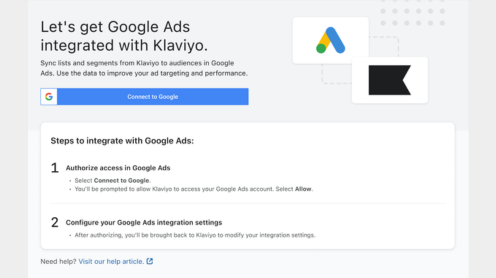
- Click Connect to Google.
-
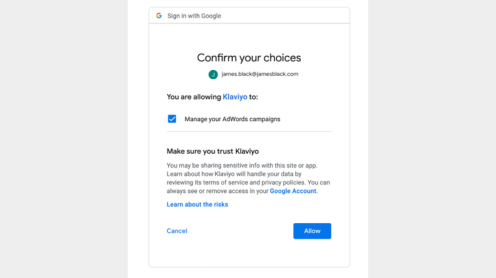
- Sign in with the Google account that has direct admin permissions on the Google Ads account you want to connect. Manager and MCC accounts will not work here.
- Review the permissions Klaviyo is requesting and click Allow to return to Klaviyo.
-
- Select the Google Ads account you want to connect from the dropdown. If the right account is missing, it usually means you do not have admin permissions on it. Fix that and try again.
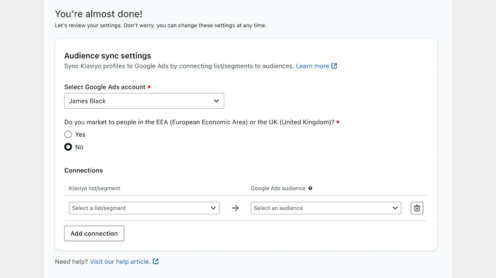
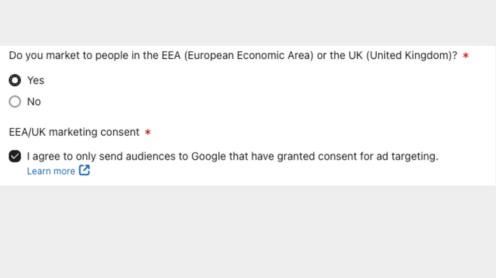
- Tell Klaviyo whether you market to people in the EEA or the UK. If you do, you will be asked to confirm that you will only send audiences who have given advertising consent. Read the consent section below before you tick this.
Step two: sync a list or segment to a Google Audience
-
- Under Connections, choose the Klaviyo list or segment you want to sync. If you need a new one, build it first under Audience then Lists and Segments.
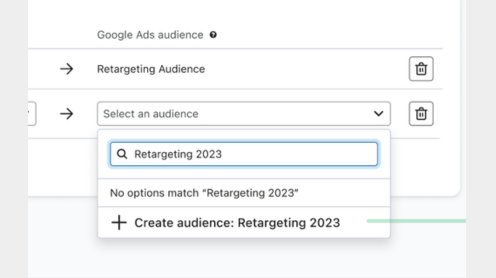
- Choose the Google Audience to connect it to. To create a fresh one, type the name into the search box and click Create audience.
-
- To add more pairings, click Add Connection. Remember the one-to-one rule: each Klaviyo segment maps to exactly one Google Audience.
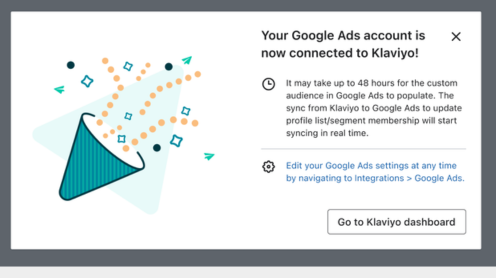
- When you are done, click Complete setup. A success message confirms the account is connected.
- Check the inbox of the Google account you connected. You will receive a manager account linking request from google.integrations@klaviyo.com. Accept it. The sync will not work properly until you do.
How the audience sync actually behaves
Understanding the timings saves you a lot of panic in the first 48 hours.
- First populate takes up to 48 hours. A brand new audience will not fill instantly. Give it two days before you judge it.
- Ongoing updates are continuous. Once live, Klaviyo pushes membership changes in real time, though Google can still take up to 48 hours to process what it receives.
- Your Google Audience will look smaller than your Klaviyo list. This is normal and expected. Only profiles that Google can match to a signed-in Google account appear in the audience. The gap is your match rate, not a fault.
- Profiles expire after 540 days unless they are refreshed, so keep your source segments active.
Which segments are worth syncing
This is where the integration earns its keep. A connected account with badly chosen segments does nothing. Here are the ones we set up most often and why.
| Segment | Why it works |
|---|---|
| Cart and checkout abandoners | Started a checkout in the last few days but did not buy. Serve an ad that mirrors your abandoned cart flow. |
| Recent browsers, no purchase | Visited key product pages without converting. Strong intent, just needed a nudge. |
| Winback | Bought once but have gone quiet. Reintroduce them with bestsellers or a returning customer offer. |
| Cross-sell | Bought product A. Show them the complementary product B they have not discovered yet. |
| Engaged non-buyers | Open your emails but have never purchased. A relevant ad can tip them over. |
| VIP and high lifetime value | Use as a targeting signal to find new people who resemble your best customers or to reward loyalty with early access. |
Suppression lists: segments to exclude
A suppression list is simply a synced audience you tell Google not to show ads to. The mechanism is the same as targeting: you build the segment in Klaviyo, sync it to a Google Audience, then in Google Ads you add it as an exclusion at campaign or ad-group level instead of as a target. Used well, suppression is often the fastest win in the whole setup, because it stops you paying to reach people who should not be in the funnel at all.
| Suppression segment | Why exclude it |
|---|---|
| Recent purchasers | Stop paying to advertise to people who just bought and are unlikely to buy again immediately. |
| Active subscribers you already reach | If your email is already landing, do not double-spend to reach the same person with prospecting budget. |
| Refund and complaint history | Spend your acquisition budget on healthier audiences. |
| Current subscribers and members | For subscription or membership brands, suppress people who are already paying so prospecting budget goes to genuinely new customers. |
Apply suppression carefully. Excluding the wrong segment or applying an exclusion at account level when you meant campaign level, can quietly block exactly the people you wanted to reach. Always read back the level and the segment name before you save.
UK and EEA advertising consent (do not skip this)
If you advertise to people in the UK or the European Economic Area, this part is not optional. Under the Digital Markets Act, Google requires that any platform syncing UK or EEA profiles into Google Ads only sends people who have granted advertising consent.
The critical point that trips brands up: advertising consent is separate from email marketing consent. Someone agreeing to receive your emails has not automatically agreed to be targeted with ads. The two are collected differently and mean different things.
Here is how to stay compliant:
- When you set up the integration, tick the option confirming you will only send audiences who have granted advertising consent. Selecting this tells Klaviyo to set the ad personalisation and ad user data consent markers for the synced profiles, so it matters that you genuinely hold that consent.
- Collect advertising consent on your site, typically through a consent management platform (a CMP such as OneTrust). This happens outside Klaviyo.
- Feed that consent status into Klaviyo as profile properties, then build your synced segments so they only include profiles that have actually consented.
If you are not sure whether your current consent collection is compliant, confirm it with your legal counsel before you sync. It is far cheaper than getting it wrong.
Attribution: reading Klaviyo and Google Ads numbers together
This is where running both channels properly separates a real result from a misleading one. Klaviyo and Google Ads both report revenue but they count it in completely different ways. Add the two figures together and you will overstate your performance, sometimes badly.
How Klaviyo counts
Klaviyo uses a last-touch attribution model. By default it credits a sale to the last email a subscriber opened or clicked within a 5-day window. SMS uses a shorter window and all of it is configurable in your account settings. So if someone clicks your email and buys three days later, Klaviyo claims that revenue for email.
How Google Ads counts
Google Ads has its own conversion tracking, its own attribution model (data-driven by default) and its own conversion window. It credits sales to ad interactions. If that same customer also clicked one of your ads inside its window, Google Ads will claim the same sale.
The double-counting trap
Because both platforms apply their own logic inside their own walls, one order can appear in your Klaviyo revenue and your Google Ads revenue at the same time. A board report that adds “Klaviyo revenue plus Google Ads revenue” will look fantastic and be wrong. This is the single most common reporting error we see when paid and email are run by two different suppliers who never reconcile their numbers.
How to handle it
- Pick one source of truth. Use GA4 or your ecommerce platform’s own analytics for blended revenue and treat each platform’s figure as its contribution, not a standalone total.
- Tag the traffic. Make sure Klaviyo emails carry UTM parameters so Klaviyo-driven sessions are distinguishable from paid sessions in GA4. Without this you cannot cleanly separate the two.
- Know your windows. If Klaviyo is attributing on a 5-day window and your Google Ads conversion window is 30 days, you are comparing different time frames. Understanding the gap stops you misreading the data.
- Use each platform for what it is good at. Klaviyo’s revenue data tells you who your high lifetime value customers are, which makes them the strongest audiences to sync. Google’s conversion data then tells you whether the campaign targeting them actually paid back
When one team owns both platforms, this reconciliation happens as a matter of routine. When it is split across two agencies, it usually does not and both will quietly take credit for the same orders. That is the practical reason the under-one-roof point at the top of this guide is not just a sales line.
Managing and monitoring your syncs
You can manage everything from the Lists and Segments tab in Klaviyo.
- Open Lists and Segments in the left navigation. Connected lists show an ad platform icon in the Integrations column.
- Click the three dots next to a list or segment and choose Linked integrations to see its sync detail.
- From the Integrations tab inside that list’s settings you can connect a new ad integration, turn a sync on or off or add a new sync and pick its Google Audience.
- Click Save after any change.
Troubleshooting
| Problem | Likely cause and fix |
|---|---|
| The right Google Ads account is not in the dropdown | You are not a direct admin or you are signed in through a manager or MCC account. Get direct admin access and reconnect. |
| The audience is empty after setup | Allow up to 48 hours to populate. Also check you accepted the linking request email from google.integrations@klaviyo.com. |
| Google Audience is much smaller than the Klaviyo segment | Expected. Only profiles matched to a signed-in Google account appear. This is your match rate, not an error. |
| Ads are not serving to the audience | The audience may be below the active-member threshold or you have layered too much extra targeting on top of a small list. Broaden the segment or reduce stacked restrictions. |
| Reach suddenly collapsed after adding an audience | Check whether the audience was set to Targeting instead of Observation. Switch it to Observation unless you intended to restrict the campaign. |
| A previously working list is now empty | It may have hit the 540-day expiry or been closed for inactivity. Refresh and repopulate it. |
Frequently asked questions
Does it cost anything to connect Klaviyo to Google Ads?
The integration itself is free to switch on. You still pay for your Google Ads spend as normal.
How long does the sync take?
A new audience can take up to 48 hours to populate. After that, updates flow continuously, although Google may take up to 48 hours to process changes it receives.
What is the minimum audience size now?
Google recommends at least 100 active members so your ads serve, down from the old 1,000 threshold. Bear in mind active members are always fewer than your total list size.
Why is my Google Audience smaller than my Klaviyo list?
Only profiles Google can match to a signed-in Google account show up. The difference is your match rate and is completely normal.
Can I connect using a manager or MCC account?
No. The connection requires direct admin access to the specific Google Ads account. You can manage the account through an MCC afterwards but the integration itself needs a direct admin login.
Do I need consent to advertise to UK customers?
Yes. Under the Digital Markets Act you must hold advertising consent for UK and EEA profiles before syncing them and that consent is separate from email marketing consent.
Will Klaviyo and Google Ads both claim the same sales?
Yes, they can. Each platform attributes conversions using its own model inside its own walls, so the same order can appear in both revenue figures. Never add the two totals together. Use GA4 or your store analytics as the blended source of truth and read each platform’s number as its contribution rather than a standalone total.
Should I use Targeting or Observation?
For layering a Klaviyo audience onto an existing Search or Shopping campaign, use Observation. Only use Targeting when you are deliberately building a campaign or ad group that should serve to that audience and nobody else.